Syncing Property Listings from Dynamics 365 ERP to Storyblok
If you manage property listings in Microsoft Dynamics 365 ERP, you probably keep two systems running side by side. Dynamics 365 holds prices, taxes, availability, and basic attributes. Your CMS holds photos, descriptions, landing pages, and SEO content.
When teams copy data from Dynamics 365 into the CMS by hand, things go wrong. Updates are slow. Details get missed. One system says “available” while the website still shows “sold.” Expanding to new markets or languages only makes this harder.
This article explains a practical way to connect Dynamics 365 ERP with Storyblok, a headless CMS, so property listings stay in sync without manual updates.
Dynamics 365 remains the source for IDs, prices, and availability. Storyblok becomes the place where editors manage copy, images, and SEO fields.
You will see how we:
- Detect new and updated properties in Dynamics 365 ERP
- Map them into a simple JSON structure for Storyblok
- Create or update property pages automatically, without duplicates
- Keep Finance in charge of the numbers and Marketing in charge of the content
If you need a clear pattern for syncing property data from Dynamics 365 ERP to Storyblok, you can use this approach as a starting point and adapt it to your catalog.
Why connect Dynamics 365 ERP with Storyblok?
Property teams often split work across two systems:
- Dynamics 365 ERP holds IDs, prices, taxes, availability, and other structured fields.
- A CMS holds copy, photos, landing pages, and SEO content.
When you connect Dynamics 365 ERP with Storyblok, each team can focus on what they do best. Finance updates facts in Dynamics 365. Editors adjust copy, images, and SEO in Storyblok. The integration keeps both sides aligned.
Our integration uses:
- Stable external IDs from Dynamics 365 to match properties in Storyblok
- Webhooks or scheduled jobs to detect new and changed records
- Upsert logic in the Storyblok Management API to create or update stories for each property
New or updated properties in Dynamics 365 become stories in Storyblok within minutes. Editors can localize content, adjust headlines, and manage SEO fields without touching ERP data. Finance controls prices and availability. The website stays accurate without manual copy-paste work.
This setup works well for real estate, hotels, holiday rentals, student housing, and other property-heavy businesses that want to keep Dynamics 365 as the source of truth while using Storyblok as the publishing layer.
What is Storyblok?
Storyblok is a headless CMS. It stores and structures content, then exposes it through APIs so any front-end can fetch and render it. That front-end can be a website, app, kiosk, or any other digital touchpoint.
Editors get a visual editor and workflows. Developers get a component-based content model, versioning, and clean APIs.
For a Dynamics 365 ERP integration with Storyblok, this means you can keep property data in Dynamics 365 and still build flexible, content-rich pages on top of it.
Why Storyblok for ERP-driven listings?
Storyblok’s headless approach lets Finance keep the facts (IDs, prices, availability) authoritative in Dynamics 365 while Marketing owns the story (copy, imagery, SEO) in a visual editor. With stable external IDs, webhooks, and upsert via the Management API, you get idempotent, automated page updates: new or changed properties in ERP become stories in Storyblok—localized and SEO-ready—within minutes.
Why this matters (and for whom)
If you manage real-estate inventory—hotels, holiday rentals, student housing, commercial units—you juggle structured data in your Dynamics 365 ERP (rates, taxes, availability) and rich content in a CMS (photos, descriptions, landing pages). Manually keeping them in sync is error-prone. Our approach keeps the ERP as the source of truth and Storyblok as the publishing layer for multilingual, SEO-friendly pages.
How the MS Dynamics 365 ERP–Storyblok integration works
Solution overview
This setup connects Dynamics 365 ERP to Storyblok, keeping property pages up to date without manual work.
When Finance updates a property in Dynamics 365, the integration:
- Detects new and changed property records from a clean API or views in Dynamics 365 ERP
- Maps each record to a simple “Property” content model
- Normalizes numbers, currency, and dates into a consistent JSON format
- Calls the Storyblok Management API to create or update the matching story
- Publishes the story automatically, or sends it to preview first if you prefer
Ownership stays clear. Finance controls IDs, prices, availability, and other facts in Dynamics 365. Editors control titles, descriptions, media, and SEO fields in Storyblok. Both sides work with their own tools, while the integration keeps listings aligned.
Architecture at a glance
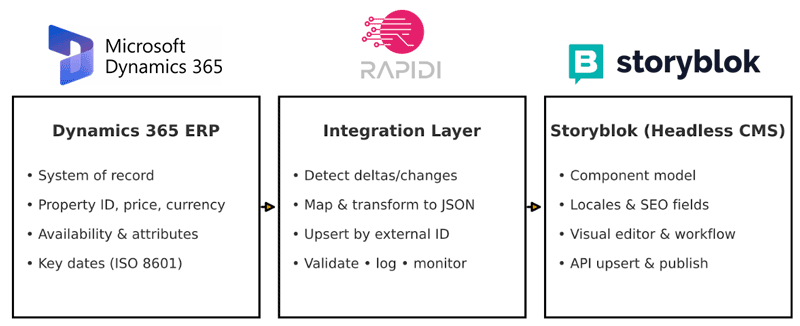
The Dynamics 365 ERP integration with Storyblok follows a simple pattern:
- Source: Dynamics 365 ERP
Stores property IDs, prices, currency, availability, attributes, and key dates.
Provides an API or view that exposes new and updated records. - Integration layer (Rapidi)
Reads property data from Dynamics 365 ERP.
Applies mapping and transformation rules to match a JSON schema for properties.
Handles validation, logging, and error handling. - Destination: Storyblok
Uses a component-based content model for property listings.
Receives JSON payloads through the Management API.
Creates or updates stories per property, including localization and SEO fields.
Supports preview and publish workflows for editors.
This architecture keeps Dynamics 365 ERP as the source of truth for structured property data while Storyblok serves as the publishing layer for content-rich, multilingual pages.
USE CASE: Dynamics 365 ERP and Storyblok SYNCHRONIZATION
The integration splits ownership between Dynamics 365 ERP and Storyblok, so each system handles what it does best.
From Dynamics 365 ERP (synced automatically)
These fields stay under Finance and Operations:
- Property ID and other identifiers
- Price and currency
- Availability status
- Key dates (launch, availability, expiry)
- Property attributes such as bedrooms, bathrooms, and area
- Basic location details (city, region, country)
In Storyblok (edited by content teams)
These fields stay under Marketing and Content:
- Titles and short teasers
- Long-form descriptions and highlights
- Media galleries (photos, videos, floor plans)
- SEO fields (meta title, meta description, open graph fields)
- Localized content per language or market
Dynamics 365 ERP feeds stable, structured data. Storyblok holds the words, images, and SEO settings that shape how each property appears on the site.
Challenges this integration solves
Before connecting Dynamics 365 ERP with Storyblok, property teams often run into the same problems:
- Slow, manual updates
Teams manually copy prices, statuses, and specs from Dynamics 365 into the CMS. This takes time and delays launches. - Conflicting information
A property can show as “available” in Dynamics 365 while the website still shows “sold” or “reserved.” This confuses buyers and puts pressure on sales and support. - Limited capacity to scale
Every new market, language, or property type adds more manual work. The more listings you have, the harder it is to keep everything aligned.
The Dynamics 365 ERP integration with Storyblok removes most of this manual effort. Property data flows from ERP to CMS in a controlled way, while editors focus on content and campaigns.
Typical implementation path
A Dynamics 365 ERP integration with Storyblok for property listings usually follows three phases.
1. Design (1–2 weeks)
- Confirm field mapping and ownership between Dynamics 365 ERP and Storyblok
- Define which fields are ERP-owned and which are CMS-owned
- Agree on URL and slug rules for property pages
- Plan how localization will work across languages and markets
2. Build (2–3 weeks)
- Configure the Storyblok content type for property listings
- Implement change detection in Dynamics 365 (view, API filter, or flag)
- Build the mapping and transformation logic into the JSON schema
- Implement the upsert flow into Storyblok (create or update per property)
- Set up monitoring, logging, and basic alerting
3. Pilot and go-live (1–2 weeks)
- Run the integration on a small set of properties
- Let Marketing and Operations test the workflow end-to-end
- Adjust mappings, content model, and rules based on feedback
- Roll out to the full catalog once the pilot is stable
This staged approach for a data integration project keeps risk low and gives both Finance and Marketing time to adapt to the new way of working.
What you need to build this integration
To connect Dynamics 365 ERP with Storyblok for property listings, you need a few clear building blocks:
- API access to Dynamics 365 ERP
A stable API or data view that exposes property records and changes. - A Storyblok space
With access to the Management API so the integration can create and update stories. - A compact content model for properties
A clear structure in Storyblok for fields like title, description, media, SEO, and links to ERP IDs. - A JSON schema for property pages
A shared schema that describes how Dynamics 365 property data maps to Storyblok. We already have a schema that can be reused and adapted. - Agree on ownership and workflows
A simple agreement on which fields belong to Dynamics 365 ERP and which belong to Storyblok. This includes rules for localization, approvals, and publishing.
Once these pieces are in place, the integration can run on a schedule or via an event-based trigger, keeping listings aligned without daily manual work.
Benefits of connecting Dynamics 365 ERP with Storyblok
A Dynamics 365 ERP integration with Storyblok for property listings delivers several clear benefits for teams.
- Faster time to market
New properties and price changes move from Dynamics 365 to the website in minutes, not days. - Better accuracy at scale
Property data comes from a single source of truth in Dynamics 365 ERP, reducing copy-and-paste errors and status mismatches. - More focused teams
Finance updates numbers once in ERP. Marketing focuses on copy, images, and campaigns in Storyblok. IT spends less time on ad-hoc fixes. - Support for many markets and languages
A clean content model in Storyblok makes it easier to run localized sites while still pulling core data from Dynamics 365. - Reusability for other catalog use cases
The same pattern can support other catalog-style content, such as hotels, rentals, or other assets in Dynamics 365 that need rich, flexible pages.
FAQs: Dynamics 365 ERP integration with Storyblok
What are the prerequisites for this integration?
You need API access or clean data views in Dynamics 365 ERP, a Storyblok space with Management API access, and a clear agreement on field ownership and integration requirements. This includes which fields are ERP-owned, which are CMS-owned, and how localization should work.
How do you prevent duplicate property pages?
We use a stable key from Dynamics 365 ERP, such as a Property ID or Project ID. The integration looks up the Storyblok story that matches this key and then creates or updates it. This upsert pattern avoids duplicate pages for the same property.
What happens if the source data in Dynamics 365 is messy or incomplete?
The integration applies validation rules before sending data to Storyblok. It checks required fields, types, and length limits. Records that fail validation are rejected and logged, so they can be corrected in Dynamics 365 before they appear on the site.
Can we add new fields later?
Yes. You can version the content model in Storyblok and extend the JSON schema. New fields can be added to the mapping so they start flowing from Dynamics 365 ERP into Storyblok once they are ready.
Can we update only specific fields, such as price or availability?
Yes. The integration can send only the fields that changed, based on rules you define. This respects ownership, so ERP-owned fields come from Dynamics 365 and CMS-owned fields stay under editor control in Storyblok.
Do you support separate environments (sandbox, staging, production)?
Yes. You can mirror environments across Dynamics 365 ERP and Storyblok. Configurations and content models are tested in the sandbox and staging before they reach production. This reduces risk when you change mappings, models, or workflows.
Next steps
If you use Microsoft Dynamics 365 ERP and want to connect it with Storyblok for property listings, we can help review your current setup and content model.