
How to integrate Salesforce with Microsoft Dynamics NAV?
Are you tired of looking for information in multiple systems to service your customers? Would you like to remove double data entries? Do you want to provide your staff with data they can trust? Wouldn't it be wonderful to have your Salesforce quotes automatically transferred to Microsoft Dynamics NAV as new orders?
A Salesforce - Microsoft Dynamics NAV integration solution can solve these pains for you. Data integration projects have the reputation to be long, cumbersome and expensive. Some say data integration can put your data at risk.
Many data integration solutions can allow you to integrate with Salesforce or to integrate with Microsoft Dynamics NAV. In fact, integrating Salesforce with Microsoft Dynamics is much easier than most people think.
WHY INTEGRATE SALESFORCE WITH DYNAMICS NAV?
You might be wondering whether integrating your systems is a good idea at all. This is a fair and common worry. Many businesses consider carefully whether or not to integrate their ERP and CRM systems.
There can potentially be many benefits from integrating systems. Many companies have integrated their Dynamics NAV or Navision system with their CRM system with great success. Usually, after integrating their systems, businesses experience:
- an increase of their systems' ROI (return on investment)
- better customer relationships
- streamlined business processes
- the ability to make informed decisions
- a higher user adoption of their systems
- a stronger competitive position
If you are using a Microsoft Dynamics ERP solution, you should consider a data integration solution that connects Salesforce with ERP.
Dynamics NAV is not the only solution that would benefit from an integration with Salesforce CRM. It is also the case if you are using Microsoft Dynamics 365 Business Central, Dynamics NAV or Navision. All these solutions are in fact the same solution that has been updated and renamed over time.

HOW TO INTEGRATE SALESFORCE WITH NAVISION / DYNAMICS NAV?
When you have decided to integrate, one important question remains. What is the best way to integrate your solutions? You can develop your own custom integration and use web services to integrate with Dynamics. This could prove to be complex.
There are many data integration connectors available on the market. Many of these solutions offer pre configured transfers. However, finding the solution that suits your needs can be tricky.
The best solutions require no need for additional programming in order to integrate systems. They can even be easy to use and maintain. But most importantly, they should be able to support your data integration needs today and in the future. Also when you need to upgrade to new versions of your systems.

If you have been using Dynamics NAV or Navision for years, it is likely that you know your system inside out. It is also very likely that your NAV solution has been customized to match the requirements of your businesses. This is very common.
When your ERP and / or CRM systems have been customized, you must choose a solution that will work. It should work regardless of versions or future upgrades.
WHICH DATA SHOULD YOU TRANSFER BETWEEN SALESFORCE AND DYNAMICS NAV?
It is wise to choose a vendor that has deep knowledge about the systems you wish to connect. This will allow you to benefit from experiences and best practices.
Rapidi has been developing data integration solutions for decades and understands how businesses operate. The Rapidi team is made up of experts within Salesforce and / or Microsoft Dynamics. Based on this experience, they have developed RapidiOnline.

The Rapidi team has gathered deep solution knowledge and understanding. Based on this, they realized that most companies want to solve the same data integration challenges. They want to integrate:
- Account data in Salesforce with Customer data in Dynamics NAV
- Products in Salesforce with Items in Dynamics NAV
- Pricelists in Salesforce with Item Pricelists in Dynamics NAV
- Sales History in Salesforce with Booked Invoices in Dynamics NAV
- Payment history in Salesforce with Customer entries in Dynamics NAV
- Opportunities in Salesforce with Sales Orders in Microsoft NAV
- Sales orders in Salesforce with Sales Orders in Microsoft NAV
The below chart illustrates the most common Salesforce - Dynamics NAV integration transfers.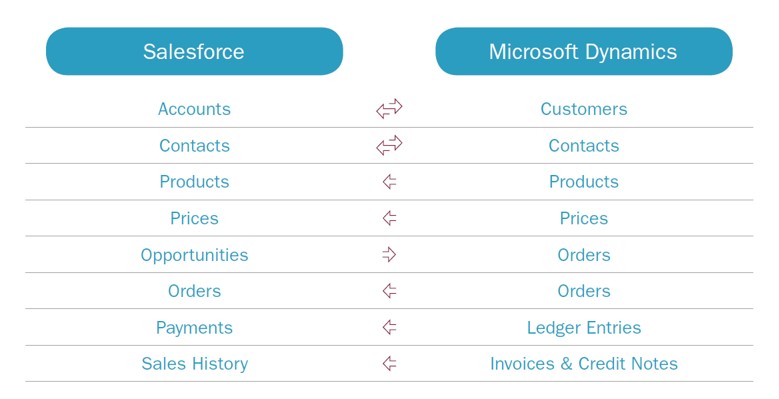
RapidiOnline was created to support the needs of such organizations. It offers these transfers as out-of-the-box standard, customizable integrations. The transfers can be done real time or based on defined triggers.
There could be other integration scenarios, especially for service and case management (Service Cloud). RapidiOnline is a data integration platform that can easily support other integration processes because creating new transfers is a simple task. It follows the same logic and does not require additional coding.
To understand how to integrate Salesforce with Microsoft Dynamics NAV, follow us on LinkedIn.