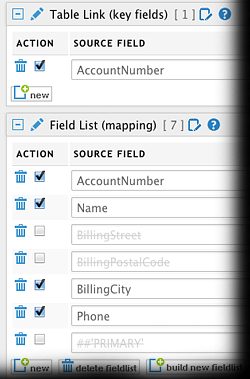
Disable and Enable Transfer Field List Lines (February 2015)
We are happy to announce to you, that we have added a new feature to MyRapidi that have been on our wish list (and I'm sure also on many of yours) for a long time:
It is now possible to disable (and enable) a single line in the "Field List (Mapping)" and also in other lists on the Transfer like "Table Link" and "Filters Source" among others.
This Feature allows you e.g. to quickly try out how a Transfer will run without a specific Field in the mapping. If you have an error running a Transfer this can come in quite handy in order to identify what Field or line is causing the error. When you are done testing, you can then quickly add the line back into the Transfer.
You still have to "Activate Changes" before you run the Transfer - this works just as before.
The feature works together with the Central Rapidi Service and hence requires that your central Rapidi Service is on version 3.2.90z or later.
In fact we added a new feature to both MyRapidi and the Central Rapidi Service to allow the MyRapidi user interface to know what version your central Rapidi Service is on and only show and enable this feature if the Service version is new enough.
This means that if you are on an older version, you will not see this feature in MyRapidi at all. As soon as the central Service is upgraded, you will see the "Disable" checkbox and be able to use it.
Please contact our support to have you central service upgraded.
As always your comments are most welcome ! Feel free to post your feedback below - we would love to hear from your how you find this feature and how we can make it even better :)
Happy Hacking !
Michael
