Features

Transfer Fields, SFDC API Calls, Comments, and Mirror Technology
Rapidi’s best data integration tools like Central Rapidi Service and RapidiConnector have evolved through continuous feature improvements that minimize errors, improve data warehousing collaborations, and add functionality to legacy systems through Mirror technology.
→
Feature: Continue on Error
In this blog post, we will go through the 'Continue on Error' feature and the 'Data Errors' page under the 'Logs'.
→
VIDEO: MyRapidi Product Update Webinar February 2022
We recently held our MyRapidi Product Update Webinar, where we walked through several new features and improvements on our data integration platform.
→
Get more out of Statistics on MyRapidi
We are pleased to announce that our newly refined and improved statistics pages are available on app5.myrapidi.com. We have been asking you about your opinion on our statistics pages and we have listened to your suggestions and redesigned the statistics pages. The ancient statistics pages only showed tabular data and it was not easy to get the sense out the data displayed. The redesigned pages now include multiple graphs from the underlying tabular data (still available under Transfers Statistics and Data Statistics). The main goal for the redesign was to display data that you would be able to understand and act on in order for you to optimise your integration setup to ensure that data is transferred in an efficient and timely manner.
→
VIDEO: MyRapidi Product Update Webinar January 2021
We recently held our MyRapidi Product Update Webinar, where we walked through several new features and improvements on our data integration platform.
→
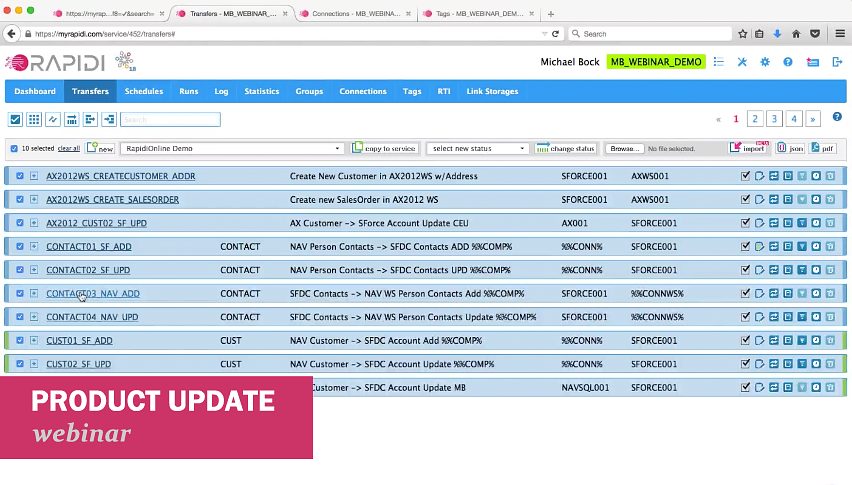
VIDEO: MyRapidi Product Update Webinar March 2019
We recently held our (annual :)) MyRapidi Product Update Webinar, where we walked through several new features and improvements on our data integration platform.
→
VIDEO: MyRapidi Product Update Webinar January 2018
We recently held our (annual :)) MyRapidi product update webinar, where we walked-through several new features from our releases throughout the year.
→
New Feature: Start & Stop All Schedules
It is with great pleasure that we can inform you that it is now possible to start or stop all selected Schedules with just a few clicks.
→
New Feature: Export and import RAPIDI configuration - JSON format
We are happy to announce that it is now possible to export your configuration to a JSON file and also to import configuration data from a JSON file.
→
New Feature: Print Configuration to PDF
We are happy to announce that it is now possible to print your Rapidi configuration to a pdf file. This new feature is part of our latest winter 2018 release where we have added a lot more functionality that you can read more about in the end of this blog post. If you need to document your Rapidi configuration this is the feature that gives you the possiblitity to do so. Below I will go through different scenarios on how to use this new feature.
→
New & Improved Comment Feature in MyRapidi
Horay my friend - we are back again with some exciting new and useful features on MyRapidi. The first feature we would like to tell you about is the Comment feature, which we gave a good brush-over and some nice enhancements which should make your work with RapidiOnline even more efficient.
→
Recap of MyRapidi Product Update Webinar January 2017
We recently held a webinar on news, tips and tricks on the MyRapidi data integration platform, where we walked-through several new features from our latest RapidiOnline releases. The main topics were the RapidiConnector, the Link Storage feature (aka key cross-referencing), the Hybrid Server installation and other new features and improvements that will help you become more efficient and more effective with your daily work with your RapidiOnline Service.
→![TAGS - Extended With Description Field [Quick Tip]](/sa/gxawp045juajqdj83u2joxa2lrrg/tags-1.jpeg)
TAGS - Extended With Description Field [Quick Tip]
We have added a description field to the TAGS feature which should make it easier for you to see which system a set of Tag Values belongs to.
→
Webinars: MyRapidi Product Update January 2017
Would like to learn how to work with MyRapidi in the most efficient way?
→
Cross Reference Keys Made Easy with the New Link Storage Feature
We are very happy to introduce you to our brand new Link Storage feature which lets you store, maintain and use Cross Reference Keys in an easy and straighforward way.
→
Easier Installation of the RapidiConnector
We are pleased to announce a new version of the RapidiConnector - it is now a lot easier to install and setup the RapidiConnector and establish connections to your local systems. Please read on to learn more.
→
'Activate Changes' feature improved and MyRapidi interface improvements
In this blog post we have accumulated a few feature updates that might be very useful to you. Please read on to learn more...
→
New Feature: Transfer Status
Working with your transfers inside MyRapidi can sometimes get overwhelming when you have many different transfers on different stages - meaning that you might have transfers that are running live, some you still have in test, others that you still are working on or some that you don't use anymore.
→
Character Sets and Conversion with Microsoft Dynamics NAV and MS SQL (3.2.92v)
Handling conversion of characters between different systems using different character sets is always very challenging. If all systems could just work natively with e.g. UTF8 then it would be much easier. But until that is the case, we (as a provider of data integration solutions) have to do our best to handle these things with as little impact for our end users as possible.
→
Support for 'SkipField' Function with Microsoft Dynamics NAV Web Service Connector (3.2.92u)
Back last sommer we introduced a new function called 'SkipField'. The function can be used as part of the mapping and will cause that Rapidi dynamically can skip sending a specific field (for a specific record) to the destination system. This is very useful
→
Transfer Destination Control Field Feature Updated (version 3.2.92i)
We have updated and added some new field-type support to our "Destination Control Field" feature on a Transfer.
→
HY010 Function Sequence Error Now Fixed (3.2.92v)
When working with MS-SQL you would in some situations receive an error message with error code "HY010 Function Sequence error". This has now been fixed.
→
Reading FlowFields from MS Dynamics NAV 2013 or later
Reading FlowFields or calculated fields from MS Dynamics NAV just got easier
→
Major MS Dynamics NAV Web Service Connector Upgrade
We are very pleased to announce that we have done a major update of our MS Dynamics NAV Web service support including brand new features like a one-step Sales Order creation, support for Codeunit Web services and in general better error handling.
→
MS Dynamics NAV Sales Order Using Web Services Made Simple
When you want to create new Sales Orders in MS Dynamics NAV the obvious choice is to publish the standard Sales Order Page (Page 42) as a Web service and use this Web service to insert the new Sales Orders in NAV.
→
DBLookup and Formulas Enhancements (Version 3.2.91y)
We have made a number of changes to the Formula system, in particular addressing the 'DBLookup' functionality. Below you will find a summary of these changes and when they were introduced.
→![RapidiOnline Service Type & Edition [Quick Tip]](/sa/eyr1sv7m935jr6nixh9jc5yu10aw/color_profiles.jpeg)
RapidiOnline Service Type & Edition [Quick Tip]
We are thrilled to announce some new visual enhancements for our customers and partners leveraging RapidiOnline.
→
MyRapidi Late Summer Release Is Now Live
We are thrilled to announce that our late summer release of the MyRapidi Configuration Interface is now live. All new enhancements and improvement should make your work life easier.
→
Webinar: MyRapidi Configuration Interface - News, Tips and Tricks
Work with your RapidiOnline Service like a Pro Would like to learn how to work with MyRapidi in the most efficient way? Would you like to get updates on new features and gain insights, tips and tricks from the experts?
→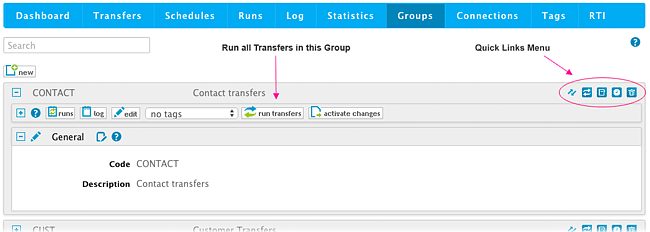
New MyRapidi Feature on Groups: Run a Group of Transfers
We have been listening to your requests and we are proud to announce a new feature on MyRapidi: Run a Group of Transfers. This new feature will enable you to run an entire group of Transfers at once.
→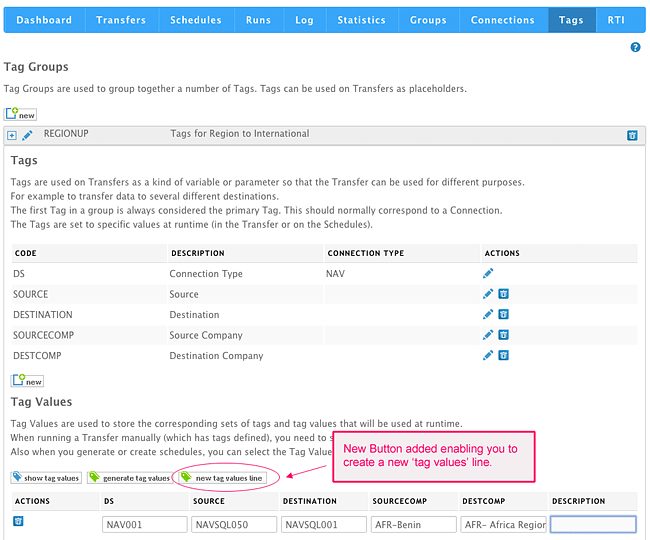
Improved Flexibility Working With MyRapidi Tags: Generate a Single 'Tag Values' Line
We now have added more flexibility into the Tags section as some customers use Tags differently from what was originally intended.
→
New Functions SkipField, BlankValue and IsBlank (version 3.2.91v)
I am happy to announce that we now have a few new functions available in RapidiOnline. These new functions serve to optimize your use of formulas in the FieldList mapping so that the formulas in general can be shorter. In this way it will not only be easier to write the formulas, but they are also easier to maintain and it's easier to quickly get an overview of a particular mapping.
→
Mirror Technology Error Handling Made Easier (version 3.2.91j)
The RapidiOnline Mirror Technology is used to detect changes in systems like MS Dynamics AX that do not provide a timestamp or similar feature to identify data changes. The Mirror Technology is fully automatic – once enabled, everything happens in the background. The benefit is that the RapidiConnector will then return only changed records instead of all records. Note that the RapidiOnline Mirror Technology is not standard sql server/database technology.
→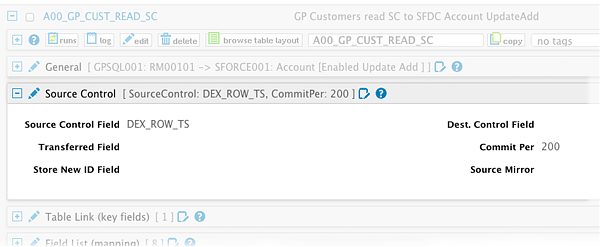
Using DEX_ROW_TS as SourceControl with MS Dynamics GP
When setting up RapidiOnline to transfer data from an ERP system to another system, we always try to find a way to read only the changed records for a given type of data. Some systems have a timestamp column in each table - this is e.g. the case for MS Dynamics NAV. The MSSQL column type timestamp is a number column that is automatically increased on every change to a record in that table by the MSSQL server, which makes it very convenient to detect changes.
→
CURRENTTIME Formula Now Works With Dynamics NAV Time Fields
The Formula CURRENTTIME generates correct time for use with NAV Time Fields
→
MyRapidi New API Server
As part of our ongoing effort to optimize our service, we have moved our Web Service API to a new server and a new codebase.
→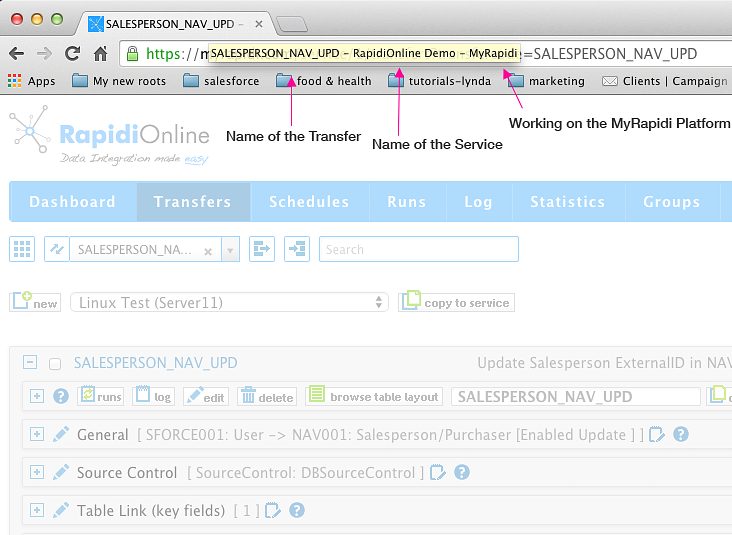
Easier to Navigate Between Multiple MyRapidi Browser Tabs
When working with MyRapidi we often find ourselves having multiple browser tabs or even several browser windows open at the same time. We have one tab with a Transfer that we work on and other tabs with Transfers that we copy stuff from and tabs with Schedules and Connections etc.
→
MyRapidi Log and Runs Optimized for Faster Response Time
In our ongoing effort to ensure fast response time of the MyRapidi platform we have done some changes to the Filtering and Search functionality under Log and Runs.
→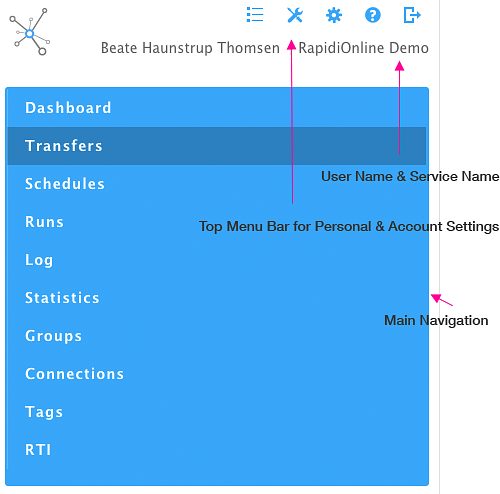
Navigation Optimized for Mobile Device
The Navigation on Myrapidi is now optimized for mobile devices - and it should now be easier to access the information needed.
→
MS Dynamics AX Company Filtering with Mirror Fix (version 3.2.91e)
When using our Mirror Technology to read data from MS Dynamics AX, we could in some cases be reading data from all MS Dynamics AX Companies instead of only one Company. This is fixed with this release.
→
New Comment Editor Feature on Transfers (Beta - February 2015)
Horay - it is a pleasure to tell you about this new feature that we have added to MyRapidi. Currently the Comment Editor is released in Beta version which means that you can use it as it is, but there will be changes to the functionality - we would really like your feedback on this, so please try it out and let us know what you think. Simply just post a comment below. Documentation and More The goal with the new comment editor feature is mainly for documentation purposes where you as a admin or user can document and describe processes and actions etc. either just for yourself but certainly also for other users. Currently the Comment Editor gives you the possibility to add comments under the Transfers section. By clicking on the Comment icon it opens up a window where you can view and search comments listed by author and date. You can also add new comments. The comment icon will indicate if there are some comments - if there are, it is filled with green text. When you hover or go over the icon it shows how many comments there are.
→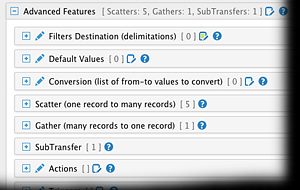
New Advanced Features Section Under Transfers (February 2015)
Navigating the Transfer section in MyRapidi and getting an overview of what a Transfer does, can sometimes be hard as there is a lot of settings you can do on each Transfer.
→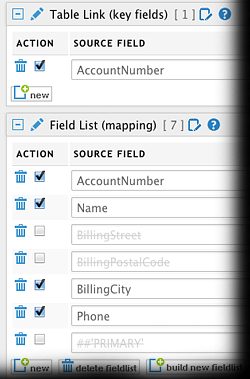
Disable and Enable Transfer Field List Lines (February 2015)
We are happy to announce to you, that we have added a new feature to MyRapidi that have been on our wish list (and I'm sure also on many of yours) for a long time:
→
MyRapidi User Interface Updates and New Features (December 2014)
We are pleased to announce a number of updates to the MyRapidi.com user interface and also some new functionality.
→
New RapidiConnector installer (msi) available for download
We are happy to announce that our new RapidiConnector installation programs have landed and are now available for download and use.
→MyRapidi interface Runs and Statistics optimised for speed
We have used quite some time during the last month on analysing the use and speed of different operations in the user interface on MyRapidi.com
→Microsoft Dynamics CRM Online fix empty dateTime (version 3.2.89e)
When having Microsoft Dynamics CRM online as destination and having a datetime field in the mapping and the value for this field was set to an empty date, then we got an error back from MS Dynamics CRM saying:
→
MyRapidi Updated Monitoring of Schedules
We have given the Schedules Monitoring a good shake up.
→MS Dynamics NAV WebService better error handling (version 3.2.88z)
For MS Dynamics NAV WS (WebServices) we have added better error handling for the ReadDesign process. Now we check for SOAP Fault messages and return these properly.
→MS Dynamics NAV SQL insert into tables with AutoIncrement fields (version 3.2.88y)
If inserting new records into MS Dynamics NAV SQL tables with an AutoIncrement field and not having the field in the Field List, then an error was returned, that you cannot insert 0 into an identity field. This was because we supply default values for all fields that are not mapped.
→For Salesforce.com we changed the way we send Double fields (version 3.2.88p)
For Salesforce.com we where sending a null value (or setting the field to null) if the value of an existing record with a Double (Numeric) field was 0. This was leading to errors from SFDC in some situation - for example when updating prices in SFDC.
→RapidiConnector Windows2003 Server compatibility (version 3.2.88o)
When running the RapidiConnector as Windows Service under Windows 2003 Server, the connector would often fail to connect to the central RapidiOnline server.
→Fixed ODBC Connector function sequence error (version 3.2.88n)
When using our generic ODBC Connector type, you could get a Function Sequence error when inserting data into the ODBC Data Source.
→Making it possible to use unlimited number of symbols in Formulas (version 3.2.88l)
Formulas have in general been limited to use a maximum of 25 or 50 symbols depending on which operating system the central version is running under.
→Adding support for SourceControl with E-conomic (version 3.2.88i)
New feature for E-conomic
→MS Dynamics CRM 2013 optimizations and new features (version 3.2.88b)
MS Dynamics CRM 2013 fixes and additional features:
→MS Dynamics CRM 2013 support ExecuteMultiple (version 3.2.87v)
For MS Dynamics CRM 2013, we now support the ExecuteMultiple method for Create, Update and Delete. ExecuteMultiple allows to send several records (Create, Update or Delete's) to CRM in one request and it greatly increases speed !
→