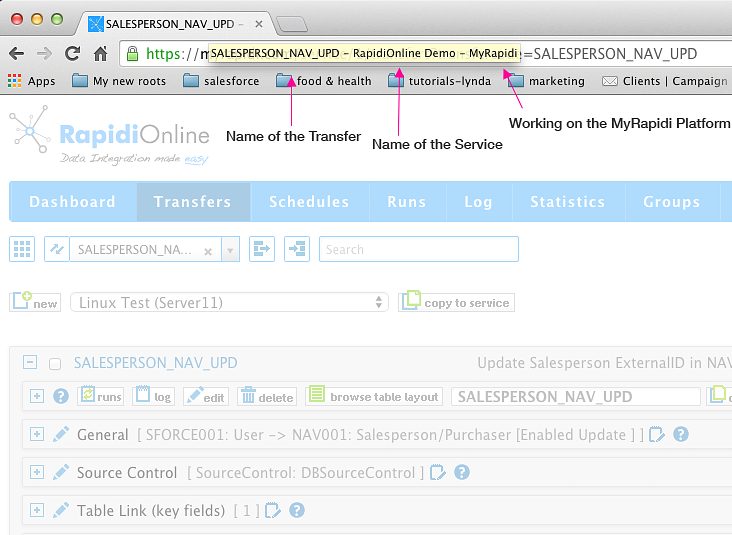
Easier to Navigate Between Multiple MyRapidi Browser Tabs
When working with MyRapidi we often find ourselves having multiple browser tabs or even several browser windows open at the same time. We have one tab with a Transfer that we work on and other tabs with Transfers that we copy stuff from and tabs with Schedules and Connections etc.
Before it could be difficult to find the correct tab to switch to when some information was needed as the titles of all tabs were the same - just MyRapidi.
We now compose the title of three elements:
- the name of the page (area or menu item) that you have open (e.g. Dashboard, Schedules, Transfers etc.)
- the name of the Service that you are working on
- and then the title MyRapidi
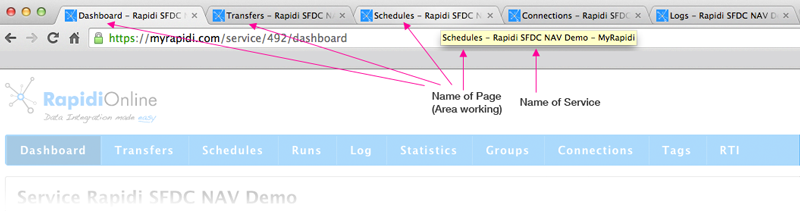
It will be easier to navigate between multiple browser tabs - you just hover over the tab and you will see immediately what the name of the page or area and service that you were working on.
Transfer Name Highlighted in Browser Title
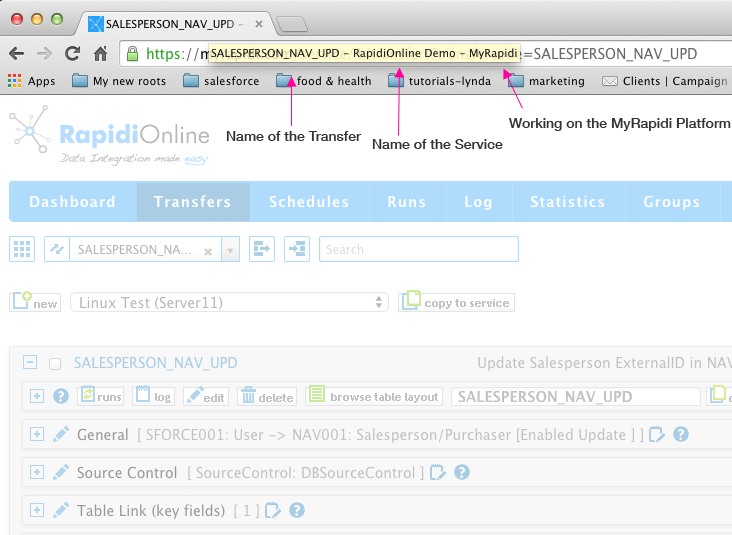
When working with Transfers you can click on a specific transfer in your list of Transfers and it will filter on that Transfer only (and open the most used sections of the transfer). When only one transfer is shown like this, we will display the Transfer Name in the Browser Title instead of just Transfers (see image below). In that way you always see what exactly you are working on.
Hopefully you will find this feature helpful and it will contribute to working more efficient with the configuration interface.
We would love to hear your feedback and appreciate and value your feedback very much - need your response to make MyRapidi how you would like it and works for you. Please leave a comment below with your feedback.
Thanks a lot.
Your RapidiOnline Team
