HY010 Function Sequence Error Now Fixed (3.2.92v)
When working with MS-SQL you would in some situations receive an error message with error code "HY010 Function Sequence error". This has now been fixed.
Situations where the "HY010 Function Sequence error" could occur
This error could occur when using one of our Connections that uses our base MS-SQL connection - so any one of MS Dynamics NAV SQL, MS Dynamics GP SQL and MS Dynamics AX could also return this error.
You could receive this error if you use a combination of "Commit Per" and then either the "Store New Id" or "Transferred Field" features on a Transfer. However, the error would only occur if there were more records to read than what the "Commit Per" was set to and more than 200 records.
Doing another Execute before fetching the next set of records
The error was caused by the fact that we use the same SQL Connection to read data from as we use to update the values back in the database. When doing a Commit then we would have to do another Execute before we Fetch the next set of records. We now do this and hence we don't get this error anymore.
Setting a proper Source Filter
However, if a proper filter on one of the fields to be updated is not set, it can then lead to an endless loop reading the same records again and again. To avoid this we now validate that such a filter is set on the transfer. This means that you might now get an error saying that you have to set a Source Filter on the field used for the "Store New Id" or the "Transferred Field" feature.
So, as long as you ensure that proper source filters are used, it is safe to use the "Commit Per' in combination with the "Store New Id" or "Transferred Field" features.
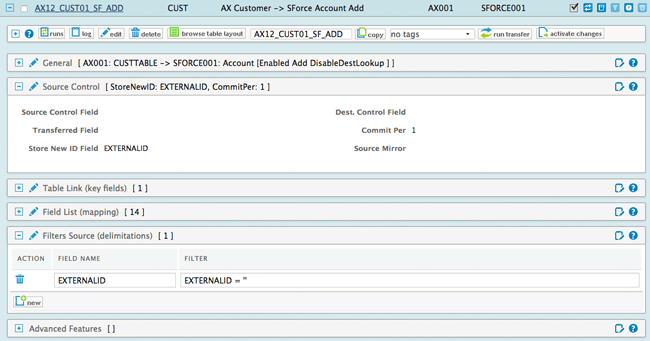
img 1: setting a prober source filter
To get this error fix, you need to upgrade your RapidiConnector to version 3.2.92v or later.
Please Contact our support to arrange this.
Thanks
Michael
Still got questions around this topic or other issues you would like to discuss. Book a time with our Customer Success Team to ensure you get the best out of your RapidiOnline Service.