
How long does it take to integrate Salesforce with Microsoft Dynamics?
All people that have been looking into any Salesforce-ERP data integration project have been asking themselves this question: how long will it take? And the answer is obviously “it depends”. But all in all, integrating Salesforce with Microsoft Dynamics ERP can be done pretty fast using RapidiOnline.
Integrating Salesforce with Microsoft Dynamics in just 3 hours
At Rapidi, we have developed pre-configured templates that can help companies integrate their Salesforce with Microsoft Dynamics AX, GP, NAV, 365 Business Central or 365 for Finance & Operations faster. These standard transfers look like this:
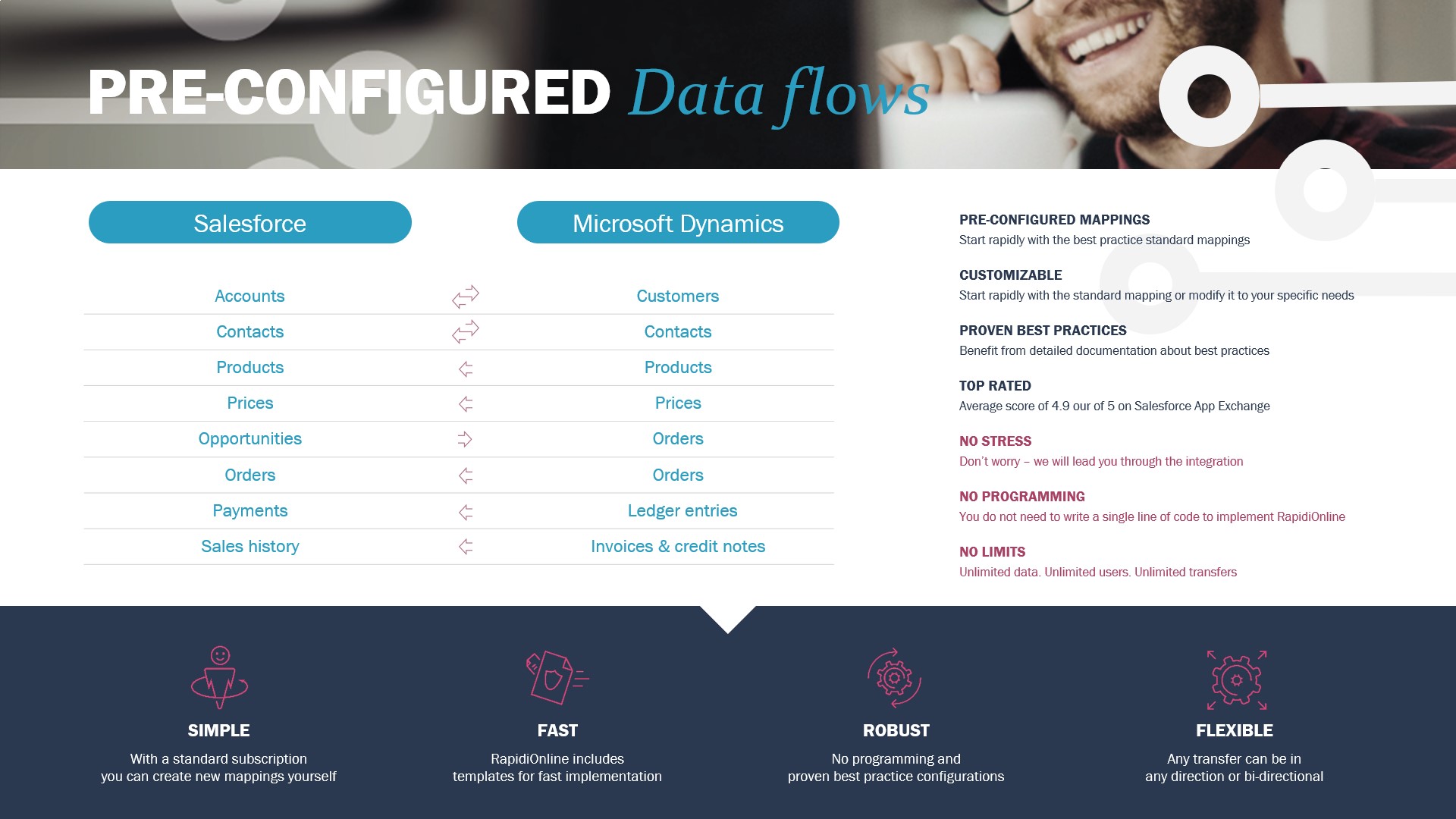
As our teams are always striving to deliver fast, high-quality data integration implementation to our clients. Our latest tests show that we can perform a Salesforce – Microsoft Dynamics 365 Business Central implementation, bi-directionally, in just 3 hours.
Which data transfers are included?
With our data integration solution, RapidiOnline, we can use these short 3 hours to:
- Setup endpoints
- Install Rapidi templates to store and display Microsoft Dynamics Business Central data in Salesforce (invoices, credit memos, ledger entries and open orders)
- Link existing records to avoid duplication
- Schedule and process the integration between Microsoft Dynamics 365 Business Central Customer <> Salesforce account
- Schedule and process integration between Business Central contacts <> Salesforce contacts
- Schedule and process integration of item and prices
- Next, all related Information:
a. Open orders – Business Central > Salesforce
b. Invoices – Business Central > Salesforce
c. Credit memos – Business Central > Salesforce
d. Ledger entries – Business Central > Salesforce
In this short time, we were also able to setup the integration of Salesforce opportunity to Business Central order. During this entire process, we have full access of all systems involved (Microsoft Dynamics Business Central, MyRapidi and Salesforce).

lEARN HOW FAST YOU CAN INTEGRATE YOUR SALESFORCE WITH mICROSOFT dYNAMICS erp
The above-mentioned example is of course based on standard version of Microsoft Dynamics Business Central and Salesforce. Your systems might have complex customizations to support your complex business processes. One of the great advantages of RapidiOnline is that it is built to handle customizations in a simple and easy way, and therefore, customizations do not have a huge impact on the implementation. While it can be longer for very complex implementations, an average implementation time for a standard RapidiOnline is 4-8 days.
You can learn more by downloading this e-book or you can contact us directly for a time and price estimate.