Microsoft dynamics integration

How Thames Water connected Salesforce and Microsoft Dynamics with Rapidi
Thames Water replaced custom-coded Salesforce-to-Microsoft-Dynamics-NAV integration with Rapidi, working with KE Consulting (KEC) on the design. The new setup cut manual reconciliation, shortened go-live, and now scales across business units without further custom code. Below is what KEC actually did, what changed after go-live, and the three lessons any team running a similar project should plan for.
→
What Are the Do's and Don'ts of a Data Integration Project?
The do's and don'ts of a data integration project come down to decisions made before a single system is connected, from data quality and stakeholder alignment to tool selection and governance. Get those right, and integration becomes a foundation for better decisions. Get them wrong, and the problems compound quickly.
→
Return on AI: Why 95% of Companies See No Results
Around 95% of enterprise AI projects fail to deliver measurable ROI. But the issue is rarely the technology itself.
→
The Hidden Cost of Bad Data in an AI World
Most AI projects fail not because the AI is bad, but because the data feeding it is broken. Without clean, connected data between CRM and ERP systems, AI amplifies errors instead of fixing them.
→
How to Manage Data Integrations Without Engineers
Managing data integration without engineers is now a strategic advantage. You can do that by using a no-code integration platform that automatically connects your systems, eliminates manual processes, and allows business users to control and monitor data flows themselves.
→
How to Integrate Salesforce with Microsoft Dynamics 365 (ERP Use Case)
Varitronics integrated Salesforce with Microsoft Dynamics 365 Business Central by keeping Salesforce as the CRM, replacing their former Salesforce-based ERP, Ascent, with Business Central, and using Rapidi to connect the two. This gave sales, finance, and operations one connected process without manual re-entry, while allowing each system to stay focused on its own role.
→
MuleSoft vs Boomi vs Rapidi: Choose The Best Data Integration Tool
MuleSoft and Boomi are powerful integration platforms with different approaches: MuleSoft is ideal for complex, API-led environments, while Boomi is more accessible for businesses that want rapid, low-code integration. Which one is better depends on the size of the company, the complexity of the systems, and the budget.
→
Integrate Salesforce & Dynamics 365 ERP in 3 Steps
Connecting Salesforce with Microsoft Dynamics 365 ERP can transform how your teams work -breaking down silos, eliminating double data entry, and giving everyone access to the same up-to-date information. But where do you start?
→![How Rapidi Helped Educate 360 Scale Business Automation [Case Story]](/sa/wzdqr4migsrdb0ntjdskbteclr5q/educate-case-story-blog.jpeg)
How Rapidi Helped Educate 360 Scale Business Automation [Case Story]
Educate 360 runs five professional training brands across multiple countries. The company uses Salesforce for sales and customer management and Microsoft Dynamics 365 Business Central for accounting. Before Rapidi, custom APIs connected these systems. Those APIs broke down under high transaction volumes, forced staff to enter data manually, and created inconsistencies across departments.
→
Hubspot + Microsoft Dynamics 365 ERP Integration Guide
Businesses that, e.g., use HubSpot to manage their customer relationships and marketing, but then also use an ERP system (such as e.g., Microsoft Dynamics 365 Business Central, Finance, etc.) for their finance operations, experience a lack of cohesion in their data, needing to update their data manually, as those two systems are not connected. This converts into inefficiency in their business processes and missed opportunities.
→
Step-by-Step Guide: Salesforce to Dynamics 365 Integration
Some data integration projects can be complex and even become a complete mess if not managed properly and efficiently. Often, the success of a data integration project (for example a Salesforce ERP integration) starts with the quality of your data. It is recommended to do a thorough data clean up before getting started. This way, your integration project will not solve your data quality issues, it will only make them more visible. When data quality is in place, you can easily avoid troubles by following a structured approach. A good way to is start by defining the touch points and data integration routes you want to support.
→
CDS, CDM and Data Integration
Industries are grappling with the challenge of managing vast amounts of data across multiple systems and departments, leading to inefficiencies, inconsistencies, and limited access to real-time information.
→
What can Salesforce CPQ-ERP integration do for your business?
Salesforce CPQ Integration enables you to connect Salesforce CPQ to other business systems (such as ERP or billing systems) to automatically synchronise product, pricing, and order data. This integration reduces manual errors, accelerates the sales cycle, and improves data visibility.
→
Choose your Salesforce Dynamics 365 BC Integration Solution
Many Salesforce integration tools can help you integrate your Salesforce CRM with your ERP solution. Some offer a broad data integration platform that lets you integrate with a wealth of other solutions.
→
HOW TO SIMPLIFY INTERNATIONAL AND MULTISITE MICROSOFT DYNAMICS NAV INTEGRATION WITH RAPIDI
Most companies running Microsoft Dynamics NAV/AX/GP in multiple countries or on multiple sites follow a Common Object Runtime Environment (CORE) strategy (also commonly called Kernel in some countries). In a CORE strategy, an add-on solution is built with company-specific requirements in mind, to then be localised and deployed in the local country.
→
How to connect Microsoft Dynamics 365 Sales with Business Central
Integration is the key to unlocking seamless operations and enhanced productivity. Microsoft Dynamics 365 ERP and Dynamics 365 Sales are powerful tools on their own, but they are not integrated by default. This is where Rapidi can help you integrate those systems and, when integrated, revolutionise the way businesses manage their operations and customer relationships. Rapidi, a no-code integration solution, simplifies this process, making it accessible to businesses of all sizes.
→
How to integrate Microsoft Azure Logic Apps with Microsoft Dynamics 365?
Microsoft Azure Logic Apps integrates with Microsoft Dynamics 365 by using pre-built connectors and APIs to automate workflows, synchronize data, and connect Dynamics 365 with other applications and services. This enables businesses to reduce manual work, improve data accuracy, and ensure real-time data flow across systems.
→
Salesforce - Microsoft Dynamics 365 Data Migration: Why and How?
Companies nowadays have to deal with vast amounts of data. Consequently, big data, data storage, data management, and data migration have become topics of the utmost importance for business leaders. Maintaining a high level of data quality is crucial. Organisations must find the best data storage solution and software solutions such as ERP, CRM, WMS, etc.Assembling the perfect set of solutions sometimes means moving data from one location to another, from one system to another. A company could be changing CRM systems from Microsoft Dynamics 365 to Salesforce. Or from Salesforce to Microsoft Dynamics 365 Sales. It could be a strategic decision or the result of a merger.Because a company’s data is one of the most valuable assets, data migration has to be performed most securely. That’s why selecting a data migration solution provider with extensive experience and robust data integration technology becomes a must.
→
Microsoft Dynamics 365 Business Central & Dynamics 365 Sales Integration
Are you contemplating a switch from Salesforce to Microsoft Dynamics 365 Sales or simply looking to integrate Dynamics 365 Business Central with Microsoft Dynamics 365 Sales?
→
Connect Salesforce with Microsoft Dynamics and Grow Your Business
Companies can benefit from integrating their ERP with their CRM in multiple ways. And in fact, the motivations behind ERP-CRM integration projects can vary depending on the size, region, or industry of a company.
→
Integrated systems keep trucks and trailers moving (case story)
What do you do when you want to improve your sales process but are limited by the data silos in your company? Finding a way to eliminate the data silos is a good place to start, but how do you do it? This is exactly the situation that one of our customers, idem telematics, was facing before they got in touch with us.
→
How to integrate Accounts and Contacts between Salesforce and Microsoft Dynamics?
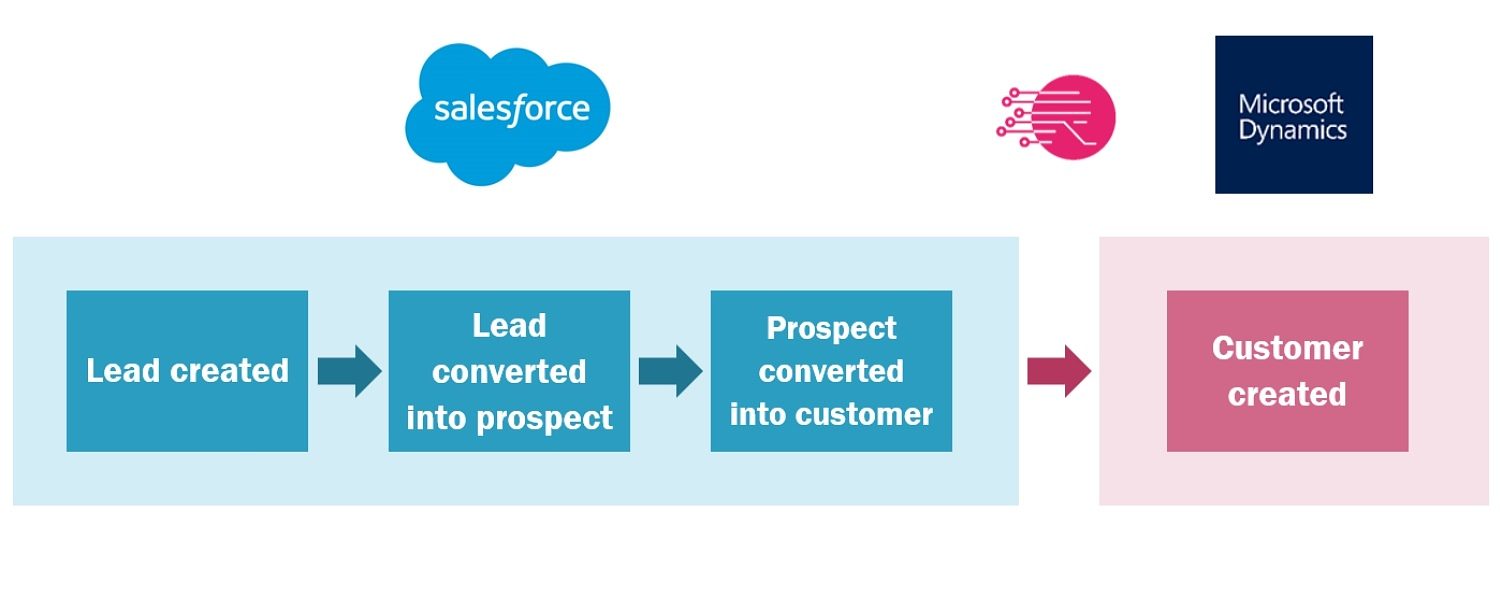
How difficult can it be to integrate accounts in Salesforce with customers in Microsoft Dynamics (or any other ERP system for that matter)? Not that difficult at first glance, you might say. And I tend to agree. See, a typical flow around account creation looks like this in your Salesforce CRM and Microsoft Dynamics ERP systems:
→
Is MS Dynamics CRM the only wise choice when you have a Dynamics ERP?
Many companies across the globe are using an ERP solution to improve the efficiency of processes across their businesses – from accounting to warehouse to inventory to fulfillment. When they have reaped the benefits that an ERP solution can give them, they soon get interest in a CRM solution to complement their ERP and bring them a new focus on customer-relationship processes and data.
→

How long does it take to integrate Salesforce with Microsoft Dynamics?
All people that have been looking into any Salesforce-ERP data integration project have been asking themselves this question: how long will it take? And the answer is obviously “it depends”. But all in all, integrating Salesforce with Microsoft Dynamics ERP can be done pretty fast using RapidiOnline.
→
How to Connect Salesforce with Microsoft Dynamics
When you connect Salesforce with Microsoft Dynamics, you share data between the two systems. This makes it simple for you to communicate with your customers, enable your teams to work together more effectively and achieve your business goals. The easiest way to connect Salesforce and Microsoft Dynamics is via RapidiOnline.
→
The future of Salesforce-Microsoft Dynamics integration
During Dreamforce 2016 I had a mission to understand how the future integration needs of companies will evolve in the next 2-3 years and what impact this evolution will have on their integration strategy. Analyzing the various sources of opinions regarding future integration needs, it came out as a pretty consistent picture.
→
Salesforce-MS Dynamics integration - Live Demo
Is it easy to integrate Salesforce with Microsoft Dynamics? It can definitely be! A system like RapidiOnline offers a no-programming, simple and fast integration option that can be used ‘out-of-the-box’, or customized and scaled to fit almost any business in a matter of days. Interested in learning more? Want to see how it works? Watch this video...
→
Boosting sales with Salesforce - NAV integration (case story)
World leader in technical embroidery, ZSK Embroidery Machines needed an upgrade of the IT tools available to their sales team. The company already had a Microsoft Dynamics NAV installation that could be used by the sales team... with effort. Since Sales Reps didn't have access to NAV they had to phone or e-mail someone on the Finance team to get the data or reports they needed. Today, they have implemented Salesforce and RapidiOnline and can report that their sales team gets more information than ever before. They are very close to a true 360 degree view of each customer.
→
All you ever wanted to know about Salesforce - Microsoft Dynamics integration
Can data integration really help you optimize processes between your Salesforce and your Microsoft Dynamics? Which processes? Can it get you a step closer to your customers and help you reach your sales goals? Can’t you successfully operate with stand-alone, isolated systems?
→