Product Updates

Feature Highlight: How to Send Schedule Notifications to Slack
Schedule Monitor has always told you when an integration schedule fails to run on time. Until now it could only tell you by email. You can now point it at a Slack channel as well, so a failed schedule shows up where your team is already working.
→
Rapidi's Slack Integration: How to Keep Your Team in the Loop through Slack
With Rapidi's integration to Slack you can receive messages from MyRapidi into your Slack Workspace. If your daily work happens a lot inside Slack you can now also receive important updates into different Slack channels instead of receiving them only via email.
→
MyRapidi Albert AI: Assistance for your integration work
When we introduced Albert in 2025, it was a bold step: an AI assistant that didn't just answer questions but actually executed tasks within your MyRapidi interface. Nearly a year later, Albert has grown from a promising beta into a comprehensive integration management assistant. Here's everything that's new.
→
How does Microsoft Dynamics 365 Sales integrate with Business Central?
Dynamics 365 Sales integrates with Business Central by connecting CRM and ERP data, allowing sales and finance teams to share customers, contacts, orders, and financial information in real time, improving accuracy, visibility, and workflow efficiency.
→
Open Office Hours Season 1: Session 15 - Rapidi MCP Server
Last week we looked at Albert, the AI assistant that lives inside MyRapidi. This week we walked through the next layer: the Rapidi MCP Server. It is the bridge that lets external AI tools like Claude reach the same context Albert has, so you can troubleshoot, configure, and run your integrations from whichever AI tool you already use.
→
Open Office Hours Season 1: Session 14 - Albert AI Agent
Last week we introduced AI in MyRapidi at a high level. This week we go one layer deeper into Albert, the AI assistant that lives inside the platform. Albert is not a bolt-on chatbot. He has direct access to your service, your documentation, and your transfer history, and he is built to help you actually get work done, from troubleshooting an error to creating a new connection or pulling a list of transfers in a specific status.
→
Open Office Hours Season 1: Session 13 - AI in MyRapidi: An Overview
Integration platforms used to be about pipes and plumbing. You connected systems, mapped fields, scheduled syncs, and watched logs. AI is changing that. The question is no longer just "how do I move this data?" but "what should the platform do for me automatically?"
→
Open Office Hours Season 1: Session 12 - Tags & Reusability
You have three subsidiaries running the same ERP. Each one needs the same Salesforce integration - same fields, same logic, same schedule. Do you really need three separate sets of transfers?
→
Open Office Hours Season 1: Session 11 - Triggers and Near-Real-Time Patterns
Your ERP has just updated a price list. Your sales team is quoting from Salesforce. How fast does that change need to reach them - and what happens if the sync fires at the wrong moment?
→
Open Office Hours Season 1: Session 10 - Scheduling: Automate Your Sync the Smart Way
When you have data flowing between two systems, getting the timing right is just as important as getting the data mapping right. In Rapidi, scheduling controls when and how your transfers run — including how often, in what order, and what happens when runs overlap.
→
Open Office Hours Season 1: Session 9 - Link Storage Deep Dive
When you sync records between two systems, there has to be something that remembers which record in the source matches which record in the destination. In Rapidi, that something is called a Link Storage. It stores the primary key pairs between your systems so that transfers know whether to create a new record or update an existing one.
→
Support Is Now Built Into MyRapidi
In our ongoing effort to provide our customers with a better experience when submitting support tickets, we have now moved our support system to MyRapidi. From today, support is built directly into MyRapidi. You will be able to see your submitted cases within the same system you use for your integration setup.
→
Open Office Hours Season 1: Session 8 - Logs & Runs: Your Troubleshooting Toolkit
When your integration throws an error, the first question is always the same: where do I look? In MyRapidi, logs and runs give you that answer. They show exactly what happened, which transfer caused it, how long it took, and what the error message says. Once you know how to read them, troubleshooting becomes a lot faster.
→
Open Office Hours Season 1: Session 6 - Timestamps & RTI
When Rapidi runs a transfer, it doesn't pull all your data every time. It only pulls what changed since the last run. That keeps your source systems from getting hammered with unnecessary queries. But how does it actually know what changed? The answer is two things working together: source control fields and the RTI.
→

Feature Highlight: How to Use Groups to Organize Transfers
This week's topic in our 'Features Highlights' video series - in which we will explain a feature on the MyRapidi platform in more depth will be about the Groups in MyRapidi. Andreea Arseni, Data Integration Consultant here at Rapidi, will explain how to set up Groups in the video below.
→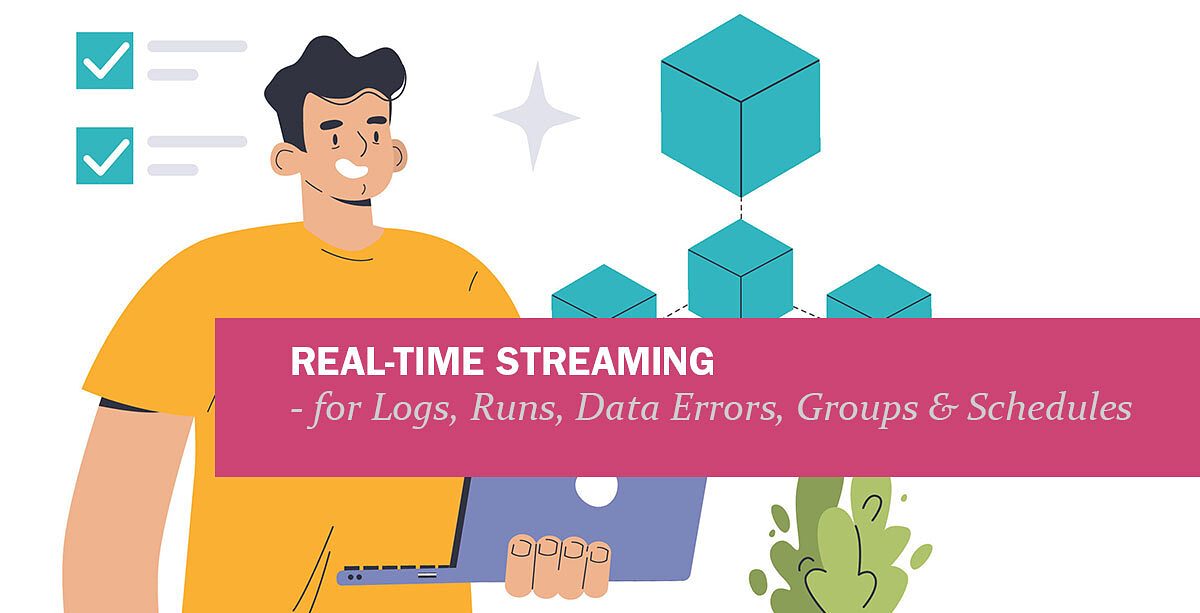
How to monitor Logs, Runs, Data Errors, Groups & Schedules in Real Time?
We've completely rebuilt how Rapidi displays live information from your integrations. Instead of manually refreshing pages or waiting for periodic updates, you now see changes as they happen.
→
What Are Open Office Hours? Season 1: Session 2 - Rapidi Transfer Design 101
On January 15, 2026, we launched our Open Office Hours series. These live training sessions run from January through April and cover everything from basic setup to advanced configuration. All Rapidi customers can join live or watch the recordings.
→
What are Open Office Hours? Season 1: Session 1 – MyRapidi Walkthrough
Starting January 15, 2026, we're launching 12 free weekly training sessions designed to help you get more confident and capable with your Rapidi integration.
→
Introducting Open Office Hours Season 1: 14 Weeks of Free Integration Training
Starting January 15, 2026, we're launching 14 free weekly training sessions designed to help you get more confident and capable with your Rapidi integration.
→
BigQuery Support: BigQuery integration with Salesforce
We are happy to inform you that we have added support for Google BigQuery to our list of supported endpoints. This means you can now, for example, send data from Google BigQuery into Salesforce (or any other system) and back via Rapidi.
→
Storyblok Support: Dynamics 365 ERP integration with Storyblok
We are happy to inform you that we have added Storyblok support to our collection of supported endpoints. This means you can now, for example, send data from Dynamics 365 ERP (and other systems) into Storyblok and back via Rapidi.
→
Stay Updated: Rapidi Product Release Notes Now Live!
We’re pleased to share that the MyRapidi Product Release Notes are now publicly available in our Wiki Documentation.
→
How to migrate OData to API Pages in Dynamics 365 Business Central
You have probably already heard the announcement that Microsoft is gradually deprecating the ability to expose UI pages as OData (and SOAP) endpoints. Instead, you will need to use API Pages. This deprecation is part of a multi-year modernization strategy to standardize integrations around API pages and Query APIs, which are purpose-built for programmatic access.
→
What are API Pages in Microsoft Dynamics 365 Business Central?
Microsoft Dynamics 365 Business Central provides a robust API framework that allows seamless integration with other systems and applications. Reading data from API pages in Business Central is a common requirement for businesses looking to automate processes, consolidate data, or connect Business Central with third-party applications. This article provides an in-depth guide to understanding and working with API pages in Business Central.
→
Feature Highlight: How To Set Up Transfers
This week's topic in our 'Features Highlights' video series - in which we will explain a feature on the MyRapidi platform in more depth will be about the Transfers in MyRapidi. Andreea Arseni, Data Integration Consultant here at Rapidi, will explain how to set up Transfers in the video below.
→
Salesforce Security Updates 2025: Crucial Steps for Rapidi Customers
Salesforce is rolling out new security measures that will impact how all integrations, including those with Rapidi, connect to Salesforce. These changes will take effect on August 28, 2025, for new Salesforce organizations, and in early September 2025 for existing ones. If you use Rapidi to connect Salesforce with other systems, you need to act now to avoid disruption.
→
Real-Time Sync with Salesforce: Instantly Update Your ERP via Rapidi
When working with CRM and ERP integrations, timing is everything. The ability to sync any changes instantly between Salesforce and your ERP system ensures that your teams work with the most accurate and up-to-date information—whether it’s a new customer record, a quote update, or a closed opportunity.
→
DLRS & Rapidi: Accurate Financial Summaries in Salesforce
Many companies struggle to get good insights from their Salesforce data. Standard reports and roll-ups don’t always give you what you need, especially if you don’t want to write code. Declarative Lookup Roll-Up Summaries (DLRS) is a free tool that helps you summarize data in Salesforce, even when objects are connected by lookup relationships instead of master-detail relationships.
→
Feature Highlight: How to set up a Link Storages
This week's topic in our 'Features Highlights' video series - in which we will explain a feature on the MyRapidi platform in more depth will be about the Link Storages in MyRapidi. Andreea Arseni, Data Integration Consultant here at Rapidi, will explain how to set up Link Storages in the video below.
→![[WEBINAR REPLAY] Salesforce and Salesforce Integration](/sa/yvp2qer43gh52m6d1fxis23di31g/salesforce-salesforce-integration.jpeg)
[WEBINAR REPLAY] Salesforce and Salesforce Integration
Do you have several Salesforce instances or organizations that need to be integrated? Or do you need to migrate your data from one Salesforce org to another org. Then Rapidi makes this task easy for you. Join us for our
→![[Webinar Replay] Integrate Salesforce & MS Dynamics 365 Finance](/sa/oq2v24y0e3wxx4q746mvi3mllh3m/webinar-sf-finance-integration-pu.jpeg)
[Webinar Replay] Integrate Salesforce & MS Dynamics 365 Finance
Watch our on-demand webinar where we'll delve into the benefits but also challenges of integrating Salesforce with Microsoft Dynamics 365 Finance. We will also demonstrate how data resides inside Salesforce once it has been integrated with MS Dynamics 365 Finance.
→
Support for Attachment to from Dynamics 365 Finance (read or write)
We’re excited to announce that we support bidirectional attachment transfers with Microsoft Dynamics 365 Finance!
→
WIKI - Improved Rapidi Documentation with Full-text Search
The MyRapidi Wiki documentation now with improved full-text search functionality: The MyRapidi Wiki documentation, integrated into the Rapidi platform, you can quickly access it by clicking the question mark icon (?) on any page or via the top-right menu. The enhanced wiki features an integrated search function that lets you scan for topics across all pages.
→
How Does Salesforce Multi‑Factor Authentication Affect Integrations?
Salesforce Multi‑Factor Authentication (MFA) affects integrations by requiring an additional verification step for any interactive login.
→
HubSpot - MS Dynamics 365 Business Central Integration
Are you looking to integrate HubSpot CRM with Microsoft Dynamics 365 ERP (Business Central, Finance)? Then we have the solution for you.
→![How To Find Documentation on MyRapidi [Quick Tip]](/sa/6bdqz5lczijrz4x3ng9ggeck34gl/wiki-doc-help.jpeg)
How To Find Documentation on MyRapidi [Quick Tip]
Whether you’re a seasoned MyRapidi veteran or a freshly minted user, this post will undoubtedly help you navigate to useful documentation drawn from our vast repository of resources that we’ve compiled to expand your knowledge and understanding of RapidiOnline’s data integration platform.
→
1 Step Upgrade from Dynamics NAV to Dynamics 365 Business Central
Upgrading from older versions of Microsoft Dynamics NAV to the latest Dynamics 365 Business Central can be daunting, especially if you need to jump several versions all at once, migrate large volumes of data, or accommodate custom objects.
→
Feature Highlight: How to set up a Schedule
This week's topic in our 'Features Highlights' video series - in which we will explain a feature on the MyRapidi platform in more depth will be about the Schedules in MyRapidi. Andreea Arseni, Data Integration Consultant here at Rapidi, will explain how to set up a Schedule in the video below.
→
Feature Highlight: How to use RTI
This week we are launching our 'Features Highlights' video series - in which we will explain a feature on the MyRapidi platform in more depth. This week's topic will be about the RTI feature in MyRapidi. What are RTIs? And how do you work with them? Andreea, Data Integration Consultant here at Rapidi, will explain all this in this video below.
→
MS Dynamics GP end of life - what about integration? Rapidi can help!
As you maybe already know, since April 2023, Microsoft announced that Dynamics Great Plains (Dynamics GP) sales will end in 2026 and the support will end in 2028.
→![[Webinar Replay] An Introduction to MyRapidi - March 2024](/sa/buv817vcnljymiqqu5d34gohq2vk/myrapidi-intro-blog-2.jpeg)
![[Webinar Replay] MyRapidi Product Update Webinar March 2024](/sa/vmaz76jp7b4xjbeyga4ifwcmj8rd/product-updates-webinar-03-24-video.jpeg)

Support for Attachment to from Dynamics 365 Sales (read or write)
We are pleased to inform you that we support the transfer of attachments to from Dynamics 365 Sales - both read and write.
→
Support for Attachment to from Dynamics 365 Business Central
We are please to inform you that we support transfer of attachments to from Dynamics 365 BC - both read and write.
→
How to set up the Salesforce Integration User
The Salesforce Integration User License provides a dedicated, API-focused account for system-to-system integrations. To set it up, create a new user in Salesforce, assign the Integration User License, and use it for API-only access to your integrations. This ensures secure, reliable, and cost-effective connections without relying on regular interactive accounts.
→
Walkthrough of MyRapidi Configuration Interface
Hello, and welcome to today's session. I will walk you through the Rapidi Data Integration Solutions and what we can do when it comes to, data integration projects.
→
How to uninstall the RapidiConnector locally
In order to uninstall a RapidiConnector locally, you would need to go through the following steps:
→
Update on how to enable Passkeys on MyRapidi
Please note: This blog post has been updated to a newer version please read this blog post: Passkeys: Easy, strong, and secure authentication
→
How to connect to MS Dynamics 365 CRM OData with OAuth2
To connect to MS Dynamics 365 CRM OData with OAuth2, register an application in Azure AD, get the Application ID and Client Secret, set up an application user in your CRM environment, and configure the connection in Rapidi using OAuth2 and your CRM URL.
→
Benefits of the new RAPIDI Hosting Platform
From October to December 2022 all Rapidi customers were moved to Rapidi's new hosting platform. In this blog post, we would like to give you a short overview of the platform and what benefits we see from using the new hosting platform.
→
Transfer Fields, SFDC API Calls, Comments, and Mirror Technology
Rapidi’s best data integration tools like Central Rapidi Service and RapidiConnector have evolved through continuous feature improvements that minimize errors, improve data warehousing collaborations, and add functionality to legacy systems through Mirror technology.
→
Feature: Continue on Error
In this blog post, we will go through the 'Continue on Error' feature and the 'Data Errors' page under the 'Logs'.
→
Runs Page Explained
This is an update on our latest changes on the Runs Page. A while ago we published this blog post about our newly resigned page on Logs, Runs, and Data Errors. Since then we have been working on improving the use of Logs data even more, in particular, we have done improvements to the Runs page.
→
VIDEO: MyRapidi Product Update Webinar February 2022
We recently held our MyRapidi Product Update Webinar, where we walked through several new features and improvements on our data integration platform.
→
Webinars: MyRapidi Product Update February 2022
MYRAPIDI PRODUCT UPDATE WEBINARS 2022 Learn about the latest features on the MyRapidi integration platform and gain insights, tips, and tricks from the experts. Sign up today and save your seat!
→
Overview of Logs, Runs & Data Errors
With our latest release of MyRapidi, we have done some changes to the Logs page.
→
Schedules in 5 different ways
With our latest release of MyRapidi, we have done some changes to the Schedules page.
→
Switching to the new version of MyRapidi on Sunday 13, 2021
Switching to the new version of MyRapidion Sunday, June 13, 2021 We are pleased to announce that on Sunday, June 13, 2021 (10 am CET, 4 am EST, 1 am PST), we will be switching to the new version of MyRapidi.
→
Get more out of Statistics on MyRapidi
We are pleased to announce that our newly refined and improved statistics pages are available on app5.myrapidi.com. We have been asking you about your opinion on our statistics pages and we have listened to your suggestions and redesigned the statistics pages. The ancient statistics pages only showed tabular data and it was not easy to get the sense out the data displayed. The redesigned pages now include multiple graphs from the underlying tabular data (still available under Transfers Statistics and Data Statistics). The main goal for the redesign was to display data that you would be able to understand and act on in order for you to optimise your integration setup to ensure that data is transferred in an efficient and timely manner.
→
VIDEO: MyRapidi Product Update Webinar January 2021
We recently held our MyRapidi Product Update Webinar, where we walked through several new features and improvements on our data integration platform.
→
Webinars: MyRapidi Product Update January 2021
Learn about the latest features on the MyRapidi integration platform and gain insights, tips and tricks from the experts. Sign up today and save your seat!
→
Improved Schedule Monitoring
In our latest release, which came out this past Sunday, we have improved the monitoring of your Schedules in your MyRapidi Configuration interface.
→
New Release of the MyRapidi App
Dear Rapidi User, you might have noticed that we have been somewhat quiet all these pasts months, but we have been working intensively on the new release of the MyRapidi Configuration Interface and even-though it is still in BETA we invite you to start using it on app5.myrapidi.com. The new version and the current version will be running in parallel during the BETA period and you can always use the current version in case you prefer.
→
Microsoft Dynamics 365 Business Central - Salesforce Standard Integration
We are pleased to announce that we offer a standard solution for integrating Salesforce.com and Microsoft Dynamics 365 Business Central
→
VIDEO: MyRapidi Product Update Webinar March 2019
We recently held our (annual :)) MyRapidi Product Update Webinar, where we walked through several new features and improvements on our data integration platform.
→
Webinars: MyRapidi Product Update March 2019
Learn about the latest features on the Rapidi platform and gain insights, tips and tricks from the experts. Sign up today and save your seat!
→
Microsoft Dynamics 365 OData Connections
We are happy to announce that we now support OData V4 for integration with Microsoft Dynamics 365 Business Central and Microsoft Dynamics 365 for Finance and Operations. Older versions of Microsoft Dynamics are also supported - for example Microsoft Dynamics NAV 2016 and 2017.
→
New Feature: The Activity History in MyRapidi
In our latest release of the 29th of July, 2018 we also released the first version of the 'Activity History' page (under Settings > Account Settings). The 'Activity History' allows you to track the activity on your entire Account. We have now refined it and have released the latest version of it on the 1st of September 2018. The 'Activity History' has been a wish from many of you.
→
How to enable Two-factor Authentication (2FA) on MyRapidi
We are happy to announce that now you are able to use Two-factor authentication on MyRapidi. Below we will explain in more details what two-factor authentication is, what supported in MyRapidi and how to set it up.
→
ACTION REQUIRED: New Rapidi Service Access Management
We are pleased to announce our new Rapidi Service Access Management feature. With this new release we have totally re-worked the way we manage and control access to the Rapidi Services. The access to a Rapidi Service is now much more fine-grained and flexible. Access levels range from a pure 'read-only' access to having edit rights in all areas and you can control edit access to the different areas of the MyRapidi application.
→
Setting up Schedules with Tags
In this blog post we will walk you through how you setup your Schedules with Tags and how you can add the Tags description to your existing Schedules.
→
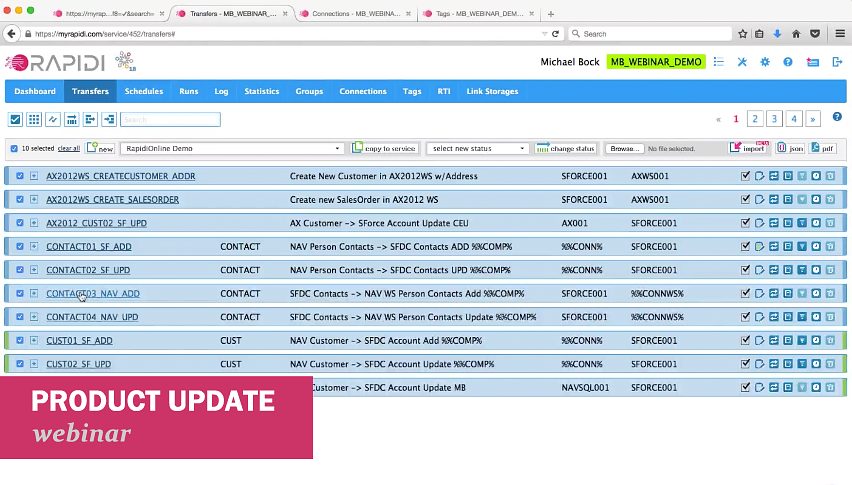
VIDEO: MyRapidi Product Update Webinar January 2018
We recently held our (annual :)) MyRapidi product update webinar, where we walked-through several new features from our releases throughout the year.
→
New Feature: Start & Stop All Schedules
It is with great pleasure that we can inform you that it is now possible to start or stop all selected Schedules with just a few clicks.
→
New Feature: Export and import RAPIDI configuration - JSON format
We are happy to announce that it is now possible to export your configuration to a JSON file and also to import configuration data from a JSON file.
→
New Feature: Print Configuration to PDF
We are happy to announce that it is now possible to print your Rapidi configuration to a pdf file. This new feature is part of our latest winter 2018 release where we have added a lot more functionality that you can read more about in the end of this blog post. If you need to document your Rapidi configuration this is the feature that gives you the possiblitity to do so. Below I will go through different scenarios on how to use this new feature.
→
Webinars: Rapidi Product Update January 2018
Learn about the latest features on the Rapidi platform and gain insights, tips and tricks from the experts. Sign up today and save your seat!
→
New & Improved Comment Feature in MyRapidi
Horay my friend - we are back again with some exciting new and useful features on MyRapidi. The first feature we would like to tell you about is the Comment feature, which we gave a good brush-over and some nice enhancements which should make your work with RapidiOnline even more efficient.
→
Recap of MyRapidi Product Update Webinar January 2017
We recently held a webinar on news, tips and tricks on the MyRapidi data integration platform, where we walked-through several new features from our latest RapidiOnline releases. The main topics were the RapidiConnector, the Link Storage feature (aka key cross-referencing), the Hybrid Server installation and other new features and improvements that will help you become more efficient and more effective with your daily work with your RapidiOnline Service.
→![TAGS - Extended With Description Field [Quick Tip]](/sa/gxawp045juajqdj83u2joxa2lrrg/tags-1.jpeg)
TAGS - Extended With Description Field [Quick Tip]
We have added a description field to the TAGS feature which should make it easier for you to see which system a set of Tag Values belongs to.
→
Webinars: MyRapidi Product Update January 2017
Would like to learn how to work with MyRapidi in the most efficient way?
→
Cross Reference Keys Made Easy with the New Link Storage Feature
We are very happy to introduce you to our brand new Link Storage feature which lets you store, maintain and use Cross Reference Keys in an easy and straighforward way.
→
Hybrid Service Installation - the Best of On-Demand and On-Premise
We are very happy to introduce you to the new Hybrid Service deployment for RapidiOnline. With this release it got much easier to deploy the RapidiOnline Service as a Hybrid Service installation.
→
Easier Installation of the RapidiConnector
We are pleased to announce a new version of the RapidiConnector - it is now a lot easier to install and setup the RapidiConnector and establish connections to your local systems. Please read on to learn more.
→
'Activate Changes' feature improved and MyRapidi interface improvements
In this blog post we have accumulated a few feature updates that might be very useful to you. Please read on to learn more...
→
New Feature: Transfer Status
Working with your transfers inside MyRapidi can sometimes get overwhelming when you have many different transfers on different stages - meaning that you might have transfers that are running live, some you still have in test, others that you still are working on or some that you don't use anymore.
→
Character Sets and Conversion with Microsoft Dynamics NAV and MS SQL (3.2.92v)
Handling conversion of characters between different systems using different character sets is always very challenging. If all systems could just work natively with e.g. UTF8 then it would be much easier. But until that is the case, we (as a provider of data integration solutions) have to do our best to handle these things with as little impact for our end users as possible.
→
Microsoft Dynamics AX 2012 Web Service Updates (3.2.93a)
I am happy to announce a major update to our support for Microsoft Dynamics AX web services. This mainly covers Microsoft Dynamics AX 2012 R1, R2 and R3 (but also some changes for Microsoft Dynamics AX 2009).
→
Support for 'SkipField' Function with Microsoft Dynamics NAV Web Service Connector (3.2.92u)
Back last sommer we introduced a new function called 'SkipField'. The function can be used as part of the mapping and will cause that Rapidi dynamically can skip sending a specific field (for a specific record) to the destination system. This is very useful
→
Now Supporting Microsoft Dynamics NAV 2016 (3.2.92z)
We are happy to announce that we now have full support for Microsoft Dynamics NAV 2016.
→
Transfer Destination Control Field Feature Updated (version 3.2.92i)
We have updated and added some new field-type support to our "Destination Control Field" feature on a Transfer.
→
HY010 Function Sequence Error Now Fixed (3.2.92v)
When working with MS-SQL you would in some situations receive an error message with error code "HY010 Function Sequence error". This has now been fixed.
→
Reading FlowFields from MS Dynamics NAV 2013 or later
Reading FlowFields or calculated fields from MS Dynamics NAV just got easier
→
Major MS Dynamics NAV Web Service Connector Upgrade
We are very pleased to announce that we have done a major update of our MS Dynamics NAV Web service support including brand new features like a one-step Sales Order creation, support for Codeunit Web services and in general better error handling.
→
MS Dynamics NAV Sales Order Using Web Services Made Simple
When you want to create new Sales Orders in MS Dynamics NAV the obvious choice is to publish the standard Sales Order Page (Page 42) as a Web service and use this Web service to insert the new Sales Orders in NAV.
→
DBLookup and Formulas Enhancements (Version 3.2.91y)
We have made a number of changes to the Formula system, in particular addressing the 'DBLookup' functionality. Below you will find a summary of these changes and when they were introduced.
→![RapidiOnline Service Type & Edition [Quick Tip]](/sa/eyr1sv7m935jr6nixh9jc5yu10aw/color_profiles.jpeg)
RapidiOnline Service Type & Edition [Quick Tip]
We are thrilled to announce some new visual enhancements for our customers and partners leveraging RapidiOnline.
→
MyRapidi Webinar: News, Tips & Tricks on Late Summer Release 2015
Just a reminder for all our customer and partners about our MyRapidi Webinar which we would like to invite you to.
→
MyRapidi Late Summer Release Is Now Live
We are thrilled to announce that our late summer release of the MyRapidi Configuration Interface is now live. All new enhancements and improvement should make your work life easier.
→
Webinar: MyRapidi Configuration Interface - News, Tips and Tricks
Work with your RapidiOnline Service like a Pro Would like to learn how to work with MyRapidi in the most efficient way? Would you like to get updates on new features and gain insights, tips and tricks from the experts?
→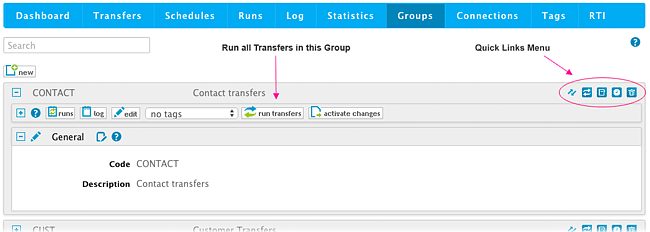
New MyRapidi Feature on Groups: Run a Group of Transfers
We have been listening to your requests and we are proud to announce a new feature on MyRapidi: Run a Group of Transfers. This new feature will enable you to run an entire group of Transfers at once.
→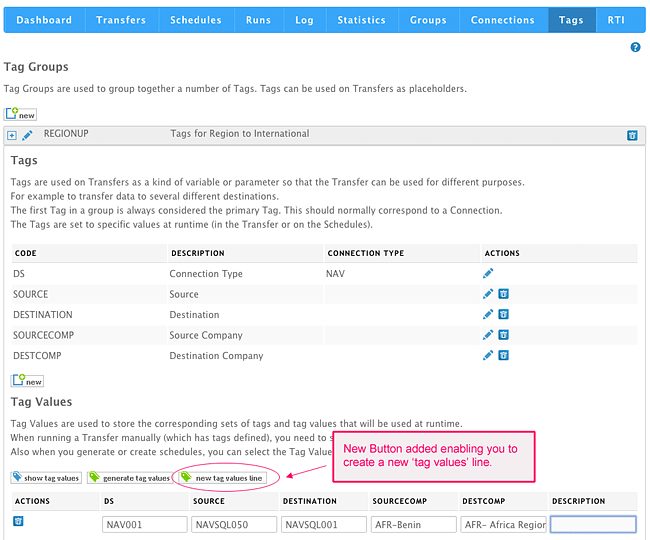
Improved Flexibility Working With MyRapidi Tags: Generate a Single 'Tag Values' Line
We now have added more flexibility into the Tags section as some customers use Tags differently from what was originally intended.
→
New Functions SkipField, BlankValue and IsBlank (version 3.2.91v)
I am happy to announce that we now have a few new functions available in RapidiOnline. These new functions serve to optimize your use of formulas in the FieldList mapping so that the formulas in general can be shorter. In this way it will not only be easier to write the formulas, but they are also easier to maintain and it's easier to quickly get an overview of a particular mapping.
→
Mirror Technology Error Handling Made Easier (version 3.2.91j)
The RapidiOnline Mirror Technology is used to detect changes in systems like MS Dynamics AX that do not provide a timestamp or similar feature to identify data changes. The Mirror Technology is fully automatic – once enabled, everything happens in the background. The benefit is that the RapidiConnector will then return only changed records instead of all records. Note that the RapidiOnline Mirror Technology is not standard sql server/database technology.
→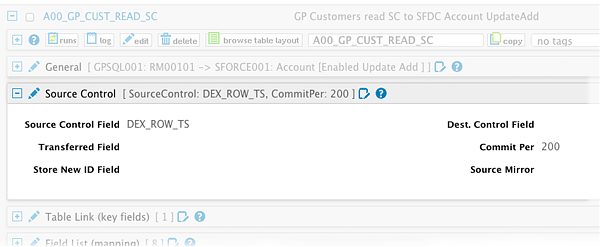
Using DEX_ROW_TS as SourceControl with MS Dynamics GP
When setting up RapidiOnline to transfer data from an ERP system to another system, we always try to find a way to read only the changed records for a given type of data. Some systems have a timestamp column in each table - this is e.g. the case for MS Dynamics NAV. The MSSQL column type timestamp is a number column that is automatically increased on every change to a record in that table by the MSSQL server, which makes it very convenient to detect changes.
→
CURRENTTIME Formula Now Works With Dynamics NAV Time Fields
The Formula CURRENTTIME generates correct time for use with NAV Time Fields
→
MyRapidi New API Server
As part of our ongoing effort to optimize our service, we have moved our Web Service API to a new server and a new codebase.
→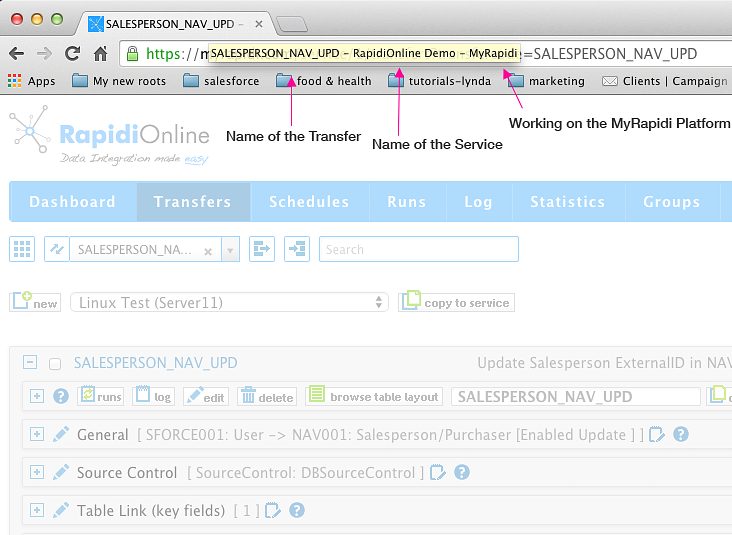
Easier to Navigate Between Multiple MyRapidi Browser Tabs
When working with MyRapidi we often find ourselves having multiple browser tabs or even several browser windows open at the same time. We have one tab with a Transfer that we work on and other tabs with Transfers that we copy stuff from and tabs with Schedules and Connections etc.
→
MyRapidi Log and Runs Optimized for Faster Response Time
In our ongoing effort to ensure fast response time of the MyRapidi platform we have done some changes to the Filtering and Search functionality under Log and Runs.
→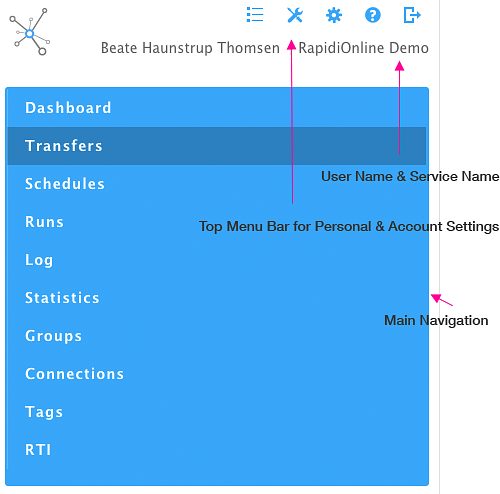
Navigation Optimized for Mobile Device
The Navigation on Myrapidi is now optimized for mobile devices - and it should now be easier to access the information needed.
→
MS Dynamics AX Company Filtering with Mirror Fix (version 3.2.91e)
When using our Mirror Technology to read data from MS Dynamics AX, we could in some cases be reading data from all MS Dynamics AX Companies instead of only one Company. This is fixed with this release.
→
Fixing "Another user changed the definition of..." (version 3.2.91c)
For some time now, we have struggled with an error message from MS Dynamics NAV C/Front when updating or adding new records in NAV. The error message that we got is "Another user changed the definition of table xxx", where xxx is the NAV table that we try to write to.
→
New Comment Editor Feature on Transfers (Beta - February 2015)
Horay - it is a pleasure to tell you about this new feature that we have added to MyRapidi. Currently the Comment Editor is released in Beta version which means that you can use it as it is, but there will be changes to the functionality - we would really like your feedback on this, so please try it out and let us know what you think. Simply just post a comment below. Documentation and More The goal with the new comment editor feature is mainly for documentation purposes where you as a admin or user can document and describe processes and actions etc. either just for yourself but certainly also for other users. Currently the Comment Editor gives you the possibility to add comments under the Transfers section. By clicking on the Comment icon it opens up a window where you can view and search comments listed by author and date. You can also add new comments. The comment icon will indicate if there are some comments - if there are, it is filled with green text. When you hover or go over the icon it shows how many comments there are.
→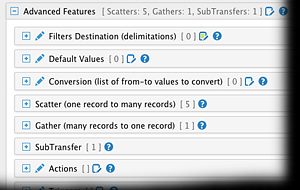
New Advanced Features Section Under Transfers (February 2015)
Navigating the Transfer section in MyRapidi and getting an overview of what a Transfer does, can sometimes be hard as there is a lot of settings you can do on each Transfer.
→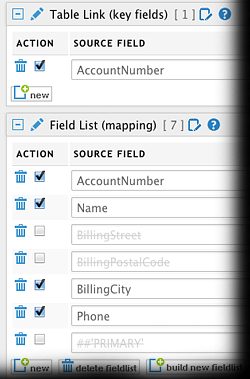
Disable and Enable Transfer Field List Lines (February 2015)
We are happy to announce to you, that we have added a new feature to MyRapidi that have been on our wish list (and I'm sure also on many of yours) for a long time:
→
MyRapidi User Interface Updates and New Features (December 2014)
We are pleased to announce a number of updates to the MyRapidi.com user interface and also some new functionality.
→
New RapidiConnector installer (msi) available for download
We are happy to announce that our new RapidiConnector installation programs have landed and are now available for download and use.
→MyRapidi interface Runs and Statistics optimised for speed
We have used quite some time during the last month on analysing the use and speed of different operations in the user interface on MyRapidi.com
→Microsoft Dynamics CRM Online fix empty dateTime (version 3.2.89e)
When having Microsoft Dynamics CRM online as destination and having a datetime field in the mapping and the value for this field was set to an empty date, then we got an error back from MS Dynamics CRM saying:
→
MyRapidi Updated Monitoring of Schedules
We have given the Schedules Monitoring a good shake up.
→MS Dynamics NAV WebService better error handling (version 3.2.88z)
For MS Dynamics NAV WS (WebServices) we have added better error handling for the ReadDesign process. Now we check for SOAP Fault messages and return these properly.
→MS Dynamics NAV SQL insert into tables with AutoIncrement fields (version 3.2.88y)
If inserting new records into MS Dynamics NAV SQL tables with an AutoIncrement field and not having the field in the Field List, then an error was returned, that you cannot insert 0 into an identity field. This was because we supply default values for all fields that are not mapped.
→Log System fixing wrong TransferCode and GroupCode (version 3.2.88w)
In our general Log System, we did fill in a wrong TransferCode and GroupCode if several transfers where run in the same group. The "Starting Transfer" message of the 2nd transfer would have the TransferCode and GroupCode from the 1st transfer.
→MS Dynamics CRM 2013 fix writing empty option value (version 3.2.88s)
MS Dynamics CRM 2013: Fixing problem with sending empty value for option and ref/guid field. Now sending xsi:nil="true" attribute.
→MS Dynamics CRM 2013 and Salesforce.com communication fix (version 3.2.88r)
MS Dynamics CRM 2013
→For Salesforce.com we changed the way we send Double fields (version 3.2.88p)
For Salesforce.com we where sending a null value (or setting the field to null) if the value of an existing record with a Double (Numeric) field was 0. This was leading to errors from SFDC in some situation - for example when updating prices in SFDC.
→RapidiConnector Windows2003 Server compatibility (version 3.2.88o)
When running the RapidiConnector as Windows Service under Windows 2003 Server, the connector would often fail to connect to the central RapidiOnline server.
→Fixed ODBC Connector function sequence error (version 3.2.88n)
When using our generic ODBC Connector type, you could get a Function Sequence error when inserting data into the ODBC Data Source.
→Making it possible to use unlimited number of symbols in Formulas (version 3.2.88l)
Formulas have in general been limited to use a maximum of 25 or 50 symbols depending on which operating system the central version is running under.
→Adding support for SourceControl with E-conomic (version 3.2.88i)
New feature for E-conomic
→MS Dynamics CRM 2013 optimizations and new features (version 3.2.88b)
MS Dynamics CRM 2013 fixes and additional features:
→MS Dynamics CRM 2013 support ExecuteMultiple (version 3.2.87v)
For MS Dynamics CRM 2013, we now support the ExecuteMultiple method for Create, Update and Delete. ExecuteMultiple allows to send several records (Create, Update or Delete's) to CRM in one request and it greatly increases speed !
→